Friday, June 13, 2008

Browse Flickr photos through TAG GALAXY

While exploring internet today (my usual timepass when i got no work), i came across this amazing site Tag Galaxy. Tag Galaxy is an application to explore Flickr photos via virtual planetary systems. You enter a tag, and the related galaxy appears on screen.

TagGalaxy offers up a novel concept concerning Flickr and tags. The set up, as you can probably guess, is influenced by space. Essentially, Flickr tags are visualized as an arrangement of planets. The greater number of pictures within a tag category, the larger the planet will be. To start off, you simply have to enter a search term or tag into the search bar; you could enter a color, objects, a city name, etc. After you click go, you’re taken off to space, following large glowing orbs and planets. The initial effect is quite visually arresting; and it gets better. From there, click on any planet to zoom in and your planet will fill up with Flickr photos. Also, you can scroll the mouse for zooming in the planet filled with Flickr images. Click on any of these to get a larger view. To view even more photos, hit the arrows at the top and your planet will be tiled with more photos. There’s also a full screen mode, so you can enjoy the spectacle even more. To start a new search, hit ‘new tag’. You’ll be able to enter in a new term and zoom in on more galaxies.

Honestly, you can search on Flickr just as easily, but there is something insidiously addictive (which might sound bad, but it’s really, really good) about this method. I simply could not get enough clicking - clicking on planets, spinning them, rotating them on their axis, and finally playing with the pictures contained inside. The only negative thing I found to the whole experience is that it does appear to slow down some after a lot of play.

So now, discover a new way of searching images on the internet with Tag Galaxy. Enter your favorite tag or keyword and see what images and other tags are related in this stunning visualisation. This is what i tried with a tag of my name "Yogesh". And see how many images it shown related to this tag! (No pics of mine though !!!)

-------------------------------------------------------------------------------------------------------------------------------------------------------------

Thursday, June 12, 2008

Powerpoint to video converter

So the topic is related to converting powerpoint presentations to video formats. But then the question arises "Why would one need this". Well what i have observerd is that usually people face technology handicaps to shoot and share a video. However, making a powerpoint presentation is quite easy. There are already 500mn powerpoint users. People can make a video out of their powerpoint presentation and can upload the same on youtube or ipod or put it in blog or on a website. The biggest advantage is that you can burn the video on to a DVD and watch the presentations on a large TV screen.

There are a number of softwares that converts PPT to various video formats. Personally i prefer videos in AVI format as they are smaller in size comparatively. So i will be giving here methods to convert PPT into a AVI video file.


PowerPoint presentation to AVI format
  • The first method is to play slideshow on your screen and to record it at the same time with screen recording application like Wondershare DemoCreator. But I want to suggest one thing regarding screen recorder that while conversion you will not be able to do any other job and you need to open PowerPoint each time. Also there are chances of loosing animation, audio tracks etc. One more disadvantage is that you cannot convert all PowerPoint pieces at same time.
  • The Second method is using software available on various website. You can find lots of software application for PowerPoint conversion to AVI and also promising of providing best quality output. But you need to find the best one, so our suggestion is to take free trail prior to purchase.

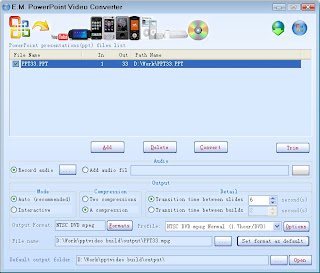
Although there are a number of softwares for PPT-Video conversion, very few of them are for FREE. The E.M. PowerPoint Video Converter is what i prefer for free conversion tool.

E.M. PowerPoint Video Converter

E.M. Free PowerPoint Video Converter is FREE and all-in-one PowerPoint to video converter. It can convert PowerPoint presentations to AVI, MPG, WMV, BMP images and MP3 audio.


Main Functions:

  • Two output mode(Auto/Interactive), Two compression mode(two compressions/a compression), Two run mode(slide/build), you can high-quality, simple, rapid convert PowerPoint file.
  • Support the output video formats: AVI, MPEG, WMV.
  • Extract and Convert PowerPoint file audio to MP3 audio.
  • Convert PowerPoint presentations to BMP mage sequences.

Key Features:
  • Support PowerPoint 2000 / 2002 / 2003 / 2007.
  • It could provide the best capability to convert PowerPoint files to other video formats.
  • Batch conversion.
  • Support attach other audio track (MP3/WMA/WAV).
  • Customizable video crop and pad for exported video.
  • Customizable trim.
  • Easy to use.

Other Features:
  • Integrate a powerful media player - Total Video Player.

File Formats Supported:

Video Formats:
  • PowerPoint (ppt) to WMV (.wmv)
  • PowerPoint (ppt) to Ms Mpeg4 AVI (.avi)
  • PowerPoint (ppt) to MPEG1 (.mpg)

Audio Formats:
  • PowerPoint (ppt) to MPEG audio(.mp3)

Image Formats:
  • PowerPoint (ppt) to BMP (.bmp)
-------------------------------------------------------------------------------------------------------------------------------------------------------------

Tuesday, June 10, 2008

Migrate to MS Exchange from Lotus Notes


According to a recent Gartner report, Microsoft continues to gain a-mail market share, and will hold approximately 70 percent of the worldwide commercial e-mail market by late 2009. Many businesses are considering moving to Microsoft platforms such as Microsoft Exchange Server 2007 and Microsoft Office SharePoint Server 2007 from their current platforms, including Lotus Notes.

Quest Software, Inc. (Nasdaq: QSFT) has a set of tools designed to migrate mailboxes and applications off of Notes, and to help manage and rebuild applications in the new environment. Quest’s comprehensive set of solutions migrate and manage the data of organizations wishing to transition off Lotus Notes to a Microsoft platform.

  • Notes Migrator for Exchange allows migrations of multiple users from Lotus Notes to Microsoft Exchange Server 2007 simultaneously. It also automates manual tasks, including mailbox creation and mail routing to simplify administration.
  • Notes Migrator for SharePoint provides direct migrations from Lotus Notes, QuickPlace and Domino.doc to Microsoft Office SharePoint Server. It migrates all Notes data, including images, file attachments, OLE objects and rich text, ensuring all critical business data is preserved. New features include analysis capabilities for helping organizations discover and classify their Notes applications, as well as components for managing large migration projects and provisioning large volumes of SharePoint sites.
  • Development Studio for SharePoint helps organizations quickly rebuild Notes applications in Microsoft Office SharePoint Server 2007 without custom coding. This suite of web parts assists in reconstructing Notes applications with a consistent look and feel as well as rich functionality, data integrity and security.

Quest Software and Avanade, Inc., a global IT consultancy, are working together to migrate organizations’ mailboxes to Microsoft Exchange Server 2007 and applications to Microsoft Office SharePoint Server 2007. Quest’s Notes migration products, coupled with Avanade’s ACA® Messaging Migration Engine, help customers successfully plan, design, migrate and implement an Exchange and SharePoint solution. Following a migration, customers can leverage Quest and Avanade’s collective expertise to develop a comprehensive deployment plan for their organization. Avanade will be among the first of Quest’s partners given access to the upcoming Notes Migrator for SharePoint 5.0 beta release, which will be announced during Microsoft Tech·Ed.

Quest Software will host a booth in the SharePoint Partner Zone at Microsoft Tech·Ed, June 10 – 13. Quest’s Notes Migration Center will be located at booth #1446 and will feature tools to migrate customers from Notes to either SharePoint or Exchange.


Pricing and Availability

Notes Migrator for Exchange is $10 per mailbox, North American pricing. North American pricing for Notes Migrator for SharePoint starts at $12,500 with reseller, quantity discounts and various options available. Development Studio for SharePoint starts at $3,000, North American pricing. All products are available.

-------------------------------------------------------------------------------------------------------------------------------------------------------------

Saturday, June 7, 2008

Shortcuts for Microsoft Word

Here’s a list of Microsoft Word keyboard shortcuts that are being used by experts for years. Word is amazing powerful and if you become well-versed in using the shortcuts, you can really save yourself a lot of time having to move your hand to your mouse in order to right-click or highlight text.

Now, the really easy shortcuts like copy and paste are not given here assuming you have used Word many times before reading this post!

  • CTRL + S
You might say “Well that’s one of those stupid ones!”, but it’s actually not! Many people do not save their documents quickly and easily using this shortcut! It would have saved many people's lots of crying or frustration! Don’t go to File and then click Save, it’s a waste of time! It is particularly helpful when computer shuts down or turn-off accidently (due to whatever reason).

  • CTRL + A
Will select all of the text in the document. This is very useful when you have to change the font type or size for the entire document. You can use this one in combination with the others, such as CTRL + D to bring up the Font Format menu.

  • CTRL + SHIFT + LEFT ARROW
This one allows you to select the last word you typed. This is useful if you messed up the last word and want to quickly re-type it without having to press backspace. You can keep pressing the arrow to select more words to the left.

  • ALT + CTRL + F
Adds a footnote at the current position of the cursor. Very useful when writing papers and having to cite your sources. At the end of the line, type the shortcut and the superscript will be created and you’ll be moved down to the bottom section where you can write your source info.

  • F7
Starts up the proofing engine, which checks your spelling and grammar. No need to keep right-clicking on each red line! Then engine will go through all of the mistakes in the current document.

  • CTRL + 1, 5, or 2
Pressing CTRL and then one of these numbers will automatically space the paragraph to either single (1), 1.5 (5) or double-space (2). You can use this one in conjunction with CTRL + A to double-space your entire doc.

  • CTRL + =, CTRL + SHIFT + =
Quick and easy way to go into subscript and superscript mode, respectively. Otherwise, you have to go through the Font dialog box, etc and that’s a real pain!

  • SHIFT + F7
You can’t live without that thesaurus these days! You can use this one with CTRL + SHIFT + LEFT ARROW to highlight the word you just wrote and then bring up the thesaurus on the selected word!

  • CTRL + K
Will either take your highlighted text and make it into a hyperlink or will allow you to create your own hyperlink from scratch.

  • ALT + CTRL + M
Adds an annotation to your current text position. Great if you’re adding comments or notes to a document, then you don’t have to use the toolbar.

  • CTRL + M
Indents the paragraph by half an inch. Good for quotes or hierarchical outlines.

  • CTRL + P, F2
Brings up the print dialog box. F2 will bring up the Print Preview.

  • CTRL + L, E, or R
Aligns the line of selected text to the left, center, or right of the screen.

  • F4
Repeats the last action performed. Very very useful when you have to change the same thing in multiple locations. Do it once and then press F4.

  • Alt + F4
Close the Word program. Will prompt if you have not saved the file.

So start using some of the shortcuts and you’ll find things work a lot faster! It takes some time to get used to, but it’s worth it. The best way is to disconnect your mouse and force yourself to use keyboard shortcuts. Enjoy!
------------------------------------------------------------------------------------------------------------------------------------------------------------------

Friday, June 6, 2008

Boost the voltage of Intel Core 2 Duo


What is overclocking?


Overclocking is pushing your CPU to run at a faster clock speed than the manufacturer has it set at.


Lets Get started!

The first step is to enter your BIOS. To do this, boot up your computer and while it begins to post hit the Delete key.

There are two main ways people go about overclocking. The first way is by increasing your FSB by 10mhz at a time and running Orthos and monitory temps, and increasing voltage when needed.

So you've decided to overclock that Core 2 Duo processor you have. Issue is, even with all the proper overclocking software and the right heat prevention gear for your components, your processor still can't output the necessary voltage to get this thing started. Instead of simply throwing away your motherboard and buying a new one, through using a variation on the "pin-mod" overclocking technique, you can easily alter the voltage with just some electrical tape and conductive ink.

The Core 2 Duos bring the joy back for the Intel Overclockers with their easy to handle heat and ample of overclock head-room. However, the overclocking capacity depends as much on the motherboards paired with them. Some of the enthusiasts on a tight budget are stuck with a limiting motherboard , particularly in the voltage department. Well now here's a way out for you!

Until recently, your only option would have been to buy a new motherboard due to limits set on the voltage output. Now, through using a variation of the tried and true “pin-mod” technique, you’ll be able to bump your voltage up from using just two tools: electrical tape and conductive ink. This mod will work on nearly all of the Core 2 Duo CPU’s by connecting a few points with the conductive ink. In the past, these points where actually “pins” that you would simply bridge within the motherboard seating to achieve a similar overclock in voltage, but without them there, the process of overclocking becomes a lot easier.

You can basically over-ride the default voltage of 1.35v inherent on many of the Intel Core 2 Duo, E6300 to X6800, with a simple "pin-mod". Well yes, there are no longer pins on these LGA packaged precessors... in fact that makes them easier to modify! All you need is some electrical insulation tape and some conductive ink!

**As some CPUs come with a different default voltages such as 1.2875v, etc, using these mods will get you different results so I will be updating with more info for CPUs with different default voltages. For now, this is for 1.35v default.**


  • Overclock to 1.4v: You will need to connect the two pins together at row three, column’s six and seven.

(To get a slight bump to 1.4v, simply connect the 'pins' shown above with conductive ink. This is a direct representation of your Processor and not your motherboard socket, do take note!)


  • Overclock to 1.45v: You will need to connect two pins together, along with covering a third pin. Connect the pins together at row’s two and three, column four. Place a pin sized piece of tape over the pin at row four, column four.


  • Overclock to 1.5v: You will need to connect two sets of pins together, along with covering a fifth pin. The first set of pins are row’s two and three, column four. The second set of pins are row three, column’s six and seven. Place a pin sized piece of tape over the pin at row four, column four.


  • Overclock to 1.55v: You will need to connect the two pins together at row’s two and three, column four.


  • Overclock to 1.6v: You will need to connect two sets of pins together, the first at row’s two and three, column four. Then connect the second set at row three, column’s six and seven.


To facilitate precision, tape over the surrounding 'pins' except the ones you are trying to connect. For example, as shown below for overclocking to 1.4v


*NOTE* This tutorial/tweak is only the first draft. I'm sure it has plenty of errors. Please point them out in your comments as you see them, and I will make changes. Thanks !

----------------------------------------------------------------------------------------------------------------------------------------------------------------------


Speed-Up loading of Adobe Acrobat Reader

Don’t you often get irritated when your acrobat reader takes 5/10 seconds to load when you want to open a pdf document?

Here is The way to speed up the loading.

1. Go to the installation folder of acrobat reader
Most of the times its C:\program files\adobe\acrobat\reader\... whatever

2. Move all the files and folders from the “plug_ins” directory to the “Optional” directory.
(Just… cut and paste the files NOT copy & paste).

  • Make sure that acrobat reader is not open else it will lock the files and not allow you to move the files.

Now run your acrobat reader, the adobe installer will run once to apply the changes you made and then your acrobat reader will load very fast and almost as fast as notepad.

-------------------------------------------------------------------------------------------------------------------------------------------------------------

Wednesday, June 4, 2008

ASUS Motherboards with Ultimate Safety and Data Security

ASUS Motherboards Offer 360° Dimensional Protection through ESD, Overcurrent Protection, Data Security-TPM and Drive Xpert.

In order to cater to the safety and security of consumers, ASUS, leading producer of motherboards worldwide, has announced key motherboard innovations to provide users with the ultimate in safety and data security. Available on the P5Q series and other top-notch motherboards, these innovations include ESD and Overcurrent Protection for safeguarding users against electrostatic discharges and overcurrent; as well as the ASUS Data Guardian (TPM) and Drive Xpert for data security and backup. With these features, users will be able to enjoy a full range of protection during everyday computing.

Electrostatic Discharge Protection (ESD)
When users walk on carpets and rugs, leave their cars, or remove some types of plastic packaging, there may be a buildup of electric static charge – sometimes as high as a few kilovolts. When contact is made to electronic devices at this time (especially computers), the accumulated electrical charge can then “jump” into the system through the fingers – creating either a system crash or other errors, or worse still – electrical damage to internal components. As depicted with the image below, the IC’s damage was caused by electric static discharge.
The European Union (EU) was the first to require testing for static discharge tolerance, and created a set of standards of protection through strict guidelines and rules (contact discharge of 4 kilovolts and air discharge of 8 kilovolts). In line with the commitment to provide the best possible customer satisfaction, ASUS has designed motherboards that surpasses the EU’s strict static electricity standards; and provide users with protection against such static discharge in the most commonly used scenarios – for example the front USB ports. Each USB port on the motherboard is protected against static electricity discharge – something which no other motherboard maker is yet to achieve. This highlights ASUS’ true commitment towards consumers – not just in terms of performance, but also to help protect users against static electricity.


Overcurrent Protection for Safe Computing
An overcurrent is a current that exceeds the amperage rating of the external device (flash memory, hard disks and etc.) or other active components in a circuit (e.g. ICs). When you connect an external device (e.g. external HDD) with a flawed circuit into your PC system, it might cause an overcurrent. Without adequate protection, an overcurrent can seriously damage components on the motherboard (e.g. ICs) or even the external device itself. ASUS’ motherboards are designed with an installed circuit that acts like fuses and circuit breakers to detect an overcurrent condition when the current reaches a value that will cause an excessive or dangerous temperature rise in conductors – and in doing so, protecting your external devices, ICs and the safety of the users themselves.


ASUS Data Guardian (TPM) for Total Data Security
Increasingly, cyber crime and ID theft are becoming more prevalent, and PC users and business client may face risks to their sensitive data and personal data through unauthorized usage, hackers, stolen hard disk drives, and even loss of critical data through the Internet and emails. The ASUS Data Guardian (TPM support) provides ultimate data security protection for the user’s personal data by creating a virtual folder that is protected by an encryption key, and then stored on a USB portable drive – allowing users to store their most valued and secret data safely against unauthorized access. With the ASUS Data Guardian, users will be able to enjoy a secure and protected working environment.

Drive Xpert – The Easy and Safe Way for Data Management
Users usually store their precious photos and favorite music in their computer hard disks. Due to the complexity in traditional backup solutions, and the long amount of time taken for backups, it is seldom convenient or easy to manage these backups; even traditional RAID options – which solve these problems, suffer from hard and complex setup processes. Thus most users do without any form of backup, and run the risk of losing their precious data in the event of crashes or accidental data loss. Without any need for drivers or complex setups, the ASUS exclusive Drive Xpert solves all these dilemmas, and is ideal for anyone who needs to secure their data on their hard drives or enhance hard drive performances without the hassles of complicated configurations. With Drive Xpert´s exclusive user-friendly graphical user interface, users can easily arrange hard drive backups or enhance their hard drive transfer rates - making sure that data is looked after every moment, every day.

-------------------------------------------------------------------------------------------------------------------------------------------------------------